AMIR
AMIR Refrigerator Thermometer, Wireless Indoor Outdoor Freezer Thermometer
AMIR Refrigerator Thermometer, Wireless Indoor Outdoor Freezer Thermometer
Couldn't load pickup availability
Product description
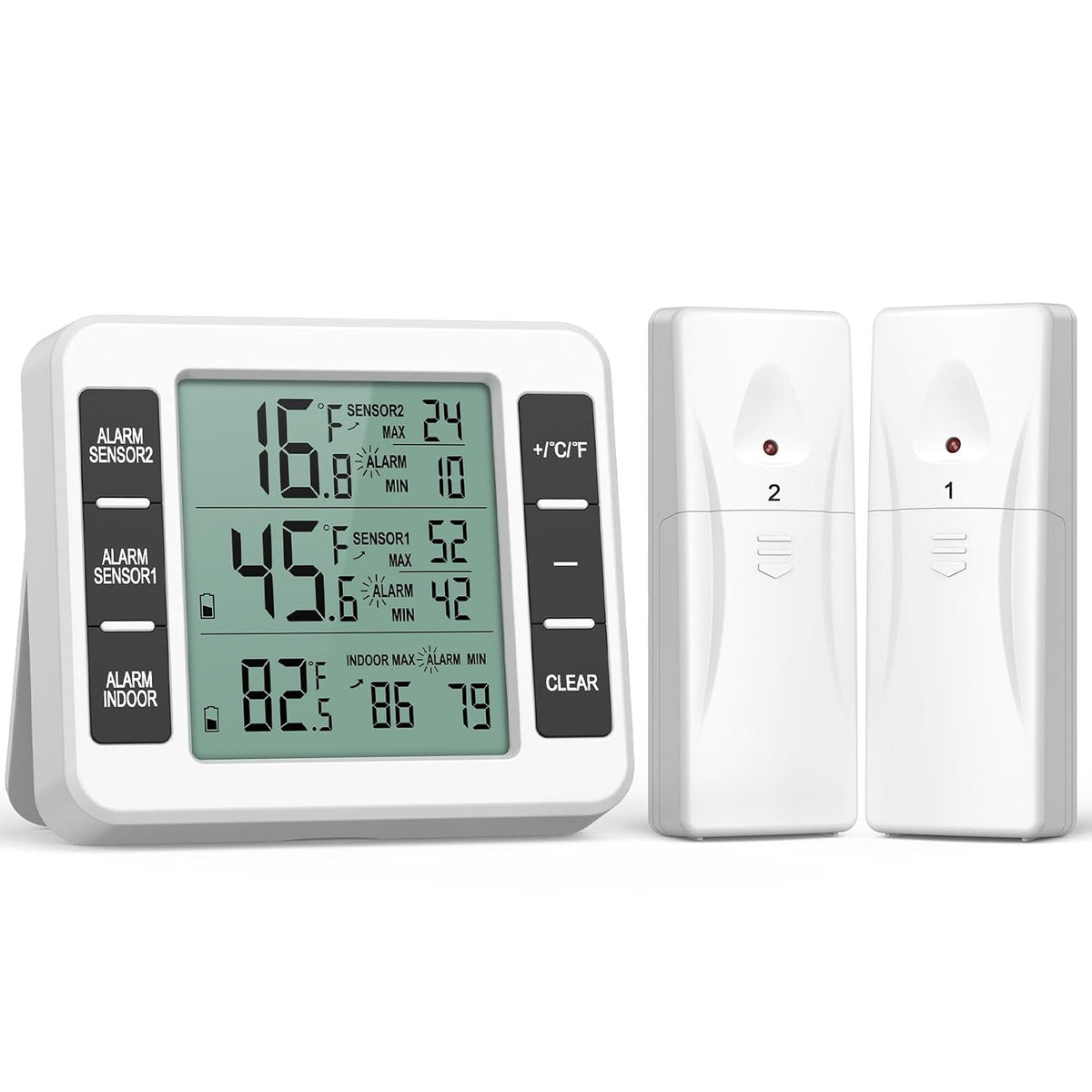
UPGRADED wireless Refrigerator Thermometer
The indicator light of the transmitter will normally show a red light after installing the batteries and will blink every minute or so to represent that it is transmitting a signal to the host computer.
The normal order of installing batteries is: first the host, then the transmitter.
-
Station & Remote Sensor
-
Wireless Range-98.4 ft
-
Ideal for Indoor/Outdoor
AMIR Refrigerator Thermometer
How to Set Temperature Alarm?
When powered up, the sensor's red light blinks once per minute. Turn on the host first, then the sensor. If the first connection fails, wait for the next blink to reconnect or use the CLEAR key to reset. If multiple attempts fail, reset by removing and reinstalling the sensor batteries.
Freezer temperature alarm prevent your food spoilage & keep food refresh & safe
While the indication is blurring, please change the battery.
- Don’t put this product in the place where it is hot, humid, dusty or full of corrosive gas, in case that its electronic components are damaged.
- It will not alarm at once when temperature exceeds pre-set. It will compare the temperature after 10 minutes. And when temperature reaches alarm value, the thermometer will alarm immediately.
- If the sensor cannot be connected?
- Please ensure that the host and transmitter normal obstacle-free (100m will be received normally); Please note that the host transmitter installed on the battery after power on, the transmitter will receive the host signal within 3 minutes
NOTE:
The transmitter won't connect and won't display properly:
- Check the transmitter red indicator. If initial pairing fails, wait for the red light flash and retry. Long-press CLEAR to reset pairing. Connection works when red light is on.
- If display still fails after multiple tries, remove and reinstall the transmitter battery. A lit red light means pairing is available.
Wrong temperature display:
- Two sets of the product (4 transmitters total) may cause signal interference and mixed readings. Install batteries one set at a time; start the second set only after the first displays correctly.
- For mismatched readings between main unit and transmitters: remove and reinstall all batteries to reset display order
About the alarm problem:
- Set alarm temperature AND turn on the alarm function. The alarm icon on screen means it is enabled. Short-press the alarm button to show the icon; alarm activates automatically after setup.
- Temperature Range: The indoor/outdoor refrigerator thermometer wireless temperature range: Indoor -10℃~ 60℃ (14℉~ 140℉), Outdoor -40℃~ 60℃ (-40℉~140℉) and the transmission range is 100M/328ft(open area). You can use it in the fridge, freezer or outdoor, which provides safe food storage.
- Audio Alarm: The wireless freezer thermometer Alarm console includes audible and visual alarms when temperature exceed your pre-set minimum and maximum alarm settings.After setting the alarm temperature, a short press on the alarm button screen will show an "alarm" icon, and the set alarm function will be turned on by default.
- Easy to Read Display: The freezer thermometer has LCD screen with large digit.Records Min and Max temperature provides the historical temperatures readings. With this feature, you can easily monitor the temperature change of your refrigerator and provide double protection to your food safety.
- Multiple Installtion Ways: The wireless thermometer with alarm is easy to install. The display unit can stand on the table, hang on the wall, magnet on the refrigerator. The wireless sensor can clip on door or hang on the wall. Note: Don’t put this product in the place where it is hot, humid, dusty or full of corrosive gas, in case that its electronic components are damaged.
- Operate Easily: There are 6 function keys on the main unit and signal indicator on the transmitter, you just press the corresponding key to turn on/off the alarm, switch the Celsius or Fahrenheit and clear the MAX/MIN records.
- 𝐍𝐨𝐭𝐞: 𝐓𝐡𝐞 𝐬𝐞𝐧𝐬𝐨𝐫 𝐢𝐬 𝐧𝐨𝐭 𝐜𝐨𝐧𝐧𝐞𝐜𝐭𝐞𝐝 𝐩𝐥𝐞𝐚𝐬𝐞 𝐭𝐫𝐲: 1. host and transmitter normal accessibility 100 meters; 2. host transmitter reloading the battery to boot, the transmitter needs to wait 3 minutes to receive the host signal; 3. simultaneously long press alarm + CLR button for 3 seconds can be forced to enter the long receiving mode; 4. replace the battery or re-switching try.
Share